Yes, human reviewers can see some Gmail and Drive content when you connect those services to consumer Gemini through Personal Intelligence. Google's policy says the material can include excerpts, summaries and information inferred from relevant emails and files. In some cases, the material reviewed can be the email or file itself.
That is a meaningful privacy consideration. It does not establish that someone routinely reads your whole inbox, or that every Gemini feature handles your documents the same way. The important questions are where you use Gemini, which account you use, and what you have connected.
A Gemini button inside Gmail, a personal account at Gemini's website, and an employer's protected Workspace account can operate under different rules. Start with the feature in front of you, rather than the logo. Google's Connected Apps policy explains the consumer Personal Intelligence case.

First, identify which Gemini you are using
Personal Intelligence with a personal Google account
This is the setting at the center of the concern: you allow Gemini Apps to use connected Google services for personalized help. Google's current eligibility guide requires an adult personal account and Keep Activity turned on. Work, school and supervised accounts are excluded.
Availability matters, too. As of November 11, 2026, the guide excludes the European Economic Area, Nigeria, Switzerland and the United Kingdom, and says the rollout is gradual. Those limits apply to Personal Intelligence. They do not mean ordinary Gemini chats in those places are automatically exempt from human review. Check the current eligibility and connection guidance before assuming a feature is available on your account.
Gemini working inside Gmail or Drive
For people with Google AI plans using Gemini inside Workspace apps, Google's Workspace privacy commitments say their Workspace content is not used to train or improve Gemini or other generative models.
The same page explicitly separates that experience from choosing to share Workspace data with Gemini Apps or Search for Personal Intelligence. The receiving service's terms then apply. Reading a reassurance about an email-summary feature inside Gmail therefore does not settle how a connected Gemini conversation is handled.
Also check whether you joined Workspace Experiments. That program has separate terms, including human review. A promise about model training should never be stretched into a promise that no human could access data under any circumstances.
Gemini supplied through a qualifying organization
Google's organizational Workspace privacy hub covers qualifying business, education and public-sector use. It says content is not human reviewed or used for generative AI model training outside the organization's domain without permission. Administrators also control important access and retention settings.
The qualifying part matters. Google's edition comparison distinguishes Gemini as a protected core service from Gemini as an additional service. The latter can fall under the consumer Gemini Apps Privacy Notice, which permits review. Workspace Individual appears in that additional-service category.
If you are unsure, ask your administrator which terms cover your Gemini session. Using an account for work, or paying for a subscription, is not enough to establish enterprise protections.
Workspace Experiments
This opt-in early-access program allows Google to collect prompts, relevant Workspace content, generated output and feedback, and permits human review. Its Experiments privacy notice also has its own retention periods: generally 18 months for Experiments data, with reviewed or annotated copies potentially kept for up to four years.
That helps explain why a Drive side-panel disclaimer mentions reviewers and Workspace Experiments. Read it alongside the terms for your actual plan and program. Neither a broad warning nor a broad reassurance should erase those distinctions.
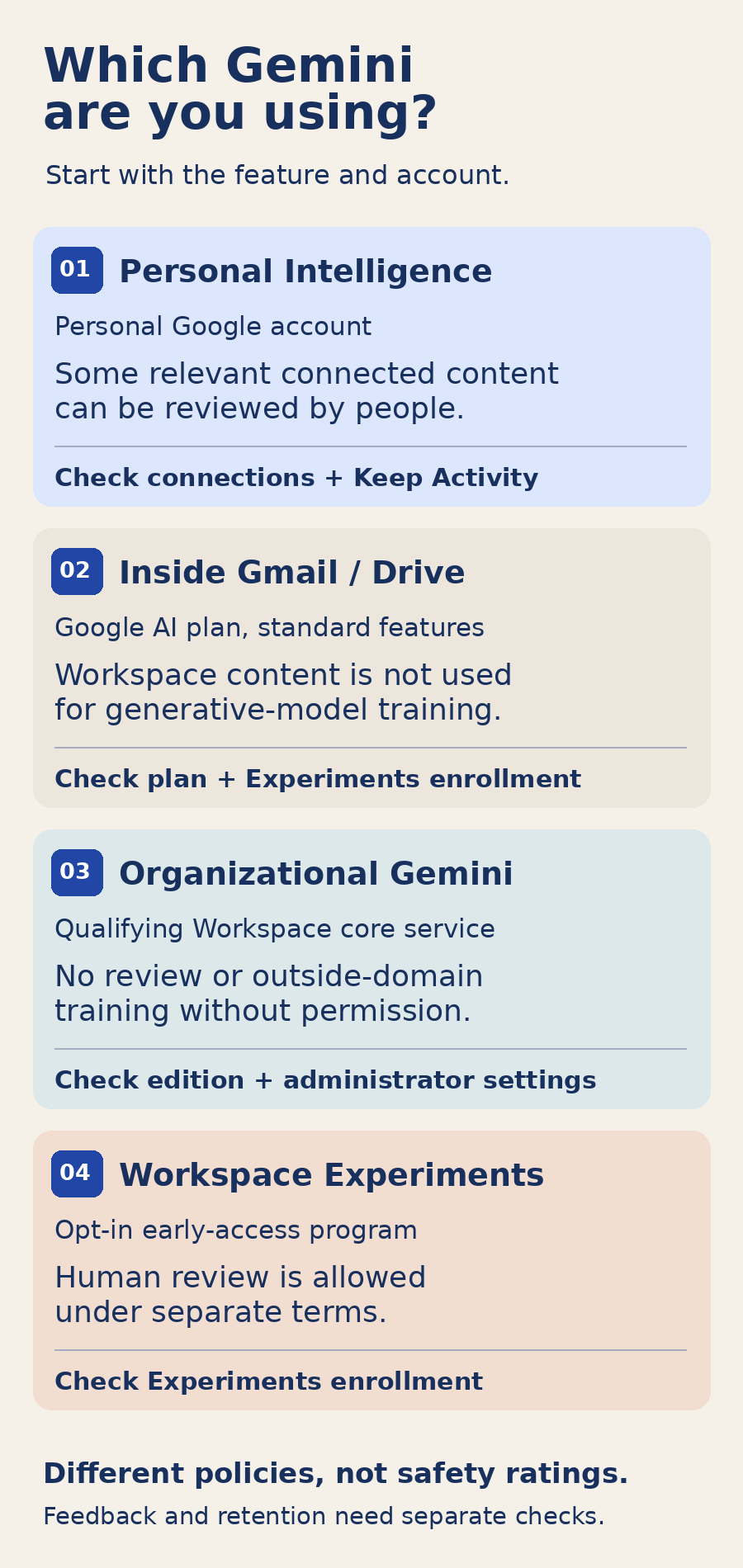
The comparison separates connected consumer personalization from ordinary in-Workspace features, protected organizational use and experimental enrollment. Its practical lesson is to check both the account and the feature before changing settings. A control in Gemini Apps does not necessarily govern a conversation inside Drive.
What reviewers may see
For Personal Intelligence, Google's policy describes a selected subset of connected material used to improve, debug and protect its services. Reviewers can include trained service providers. Google says it takes steps such as separating interactions from accounts and reducing personal information before service-provider review, with exceptions for abuse or harm.
Those safeguards are relevant, but they do not make a confidential document suitable for every use. Google itself warns against connecting apps containing information you would not want a reviewer to see.
The training language needs similar care. Google says it does not train directly on your inbox or Drive, while allowing training on relevant summaries, excerpts and inferences when Keep Activity is on. The policy describes both rules together. Neither rule tells you the probability that a particular message will be reviewed.
Match the control to what you want to stop
Stop future access from a connected app
Find Google Workspace in Gemini's connected-app settings and disconnect it. Google's documentation currently uses more than one navigation label: the personalization guide refers to Personal Intelligence and Connected Apps, while the general connector guide uses Customize and Connectors. Follow the labels available in your interface.
Disconnecting addresses the connection. It does not remove information already present in old chats. Google's removal guidance advises deleting the chats containing the information and disconnecting the app, so Gemini cannot simply find it again at the source.
Stop future chats being used for model improvement
Open Gemini's Activity settings and turn off Keep Activity. Google also offers a combined option to turn it off and delete activity. Its activity instructions say Keep Activity is on by default for adults and that new conversations with it off can remain associated with the account for up to 72 hours.
There is a feature tradeoff: the Workspace connection requires Keep Activity. Turning it off also makes Personal Intelligence unavailable.
According to the Gemini Apps Privacy Hub, future chats with activity off are not used to train Google's models unless you submit feedback. Google can still use human reviewers for protection and safety purposes. Turning activity back on can restore access to previously connected apps, so disconnect separately if that is your intention.
Remove saved conversations
Use Activity's deletion controls to choose individual entries or a period of time. This is separate from deleting an email in Gmail or a file in Drive. The activity guide lists the available deletion options.
There is an important limit: already reviewed chats and related data can remain for up to three years, disconnected from the account. Deleting your activity does not delete those review copies. Google explains that retention separately.
Keep a particular conversation out of training
Temporary chats are not used to train Google's AI models, although safety-related processing and review remain possible. Feedback is another decision: with Keep Activity off, Google can collect feedback plus the preceding 24 hours of chat context and included content to investigate and improve its services. Review what you are submitting, especially after a conversation involving connected files. The Privacy Hub covers these exceptions.
For sensitive material, the simplest precaution is to avoid bringing it into a consumer AI conversation unless its applicable terms fit your needs. Disconnecting a connector is of limited comfort if you then upload or paste the same document yourself.
This was documented before the November controversy
Google's 2023 Bard announcement promised that connected Gmail, Docs and Drive content would not be seen by reviewers. An October 16, 2026 addendum qualifies that statement for newer features that users choose to enable.
But a January 14, 2026 archived help page already contained the human-review and whole-email provisions. The October edit is not evidence that the practice began in October, much less November.
Nor does the record establish a universal automatic migration. Google's Personal Intelligence launch footnote distinguishes older, limited connections from choosing the enhanced experience.
A circulating GitHub write-up makes a further claim: that Gemini sometimes retrieves full emails or files during casual conversation without explicit app tags. Its proposed check asks the chatbot to report its retrieval payload. That account is not an authenticated tool log, and retrieval alone would not show that a reviewer later saw the material. The documented policy is sufficient reason to examine your settings without treating those alleged tests as proven.
The useful question is whether your chosen Gemini experience has privacy terms you are comfortable with. Identify the feature, verify the account protections, then decide separately about connected access, saved activity and feedback. Those choices are more precise than a blanket instruction to trust or abandon everything called Gemini.