Yes, in some circumstances. But the person at home, the type of message, and the satellite service matter as much as the phone in your hand.
You leave cell coverage with a newer iPhone. Someone at home needs to tell you that tomorrow’s pickup location has changed. Can they start the conversation, or must they wait for your check-in?
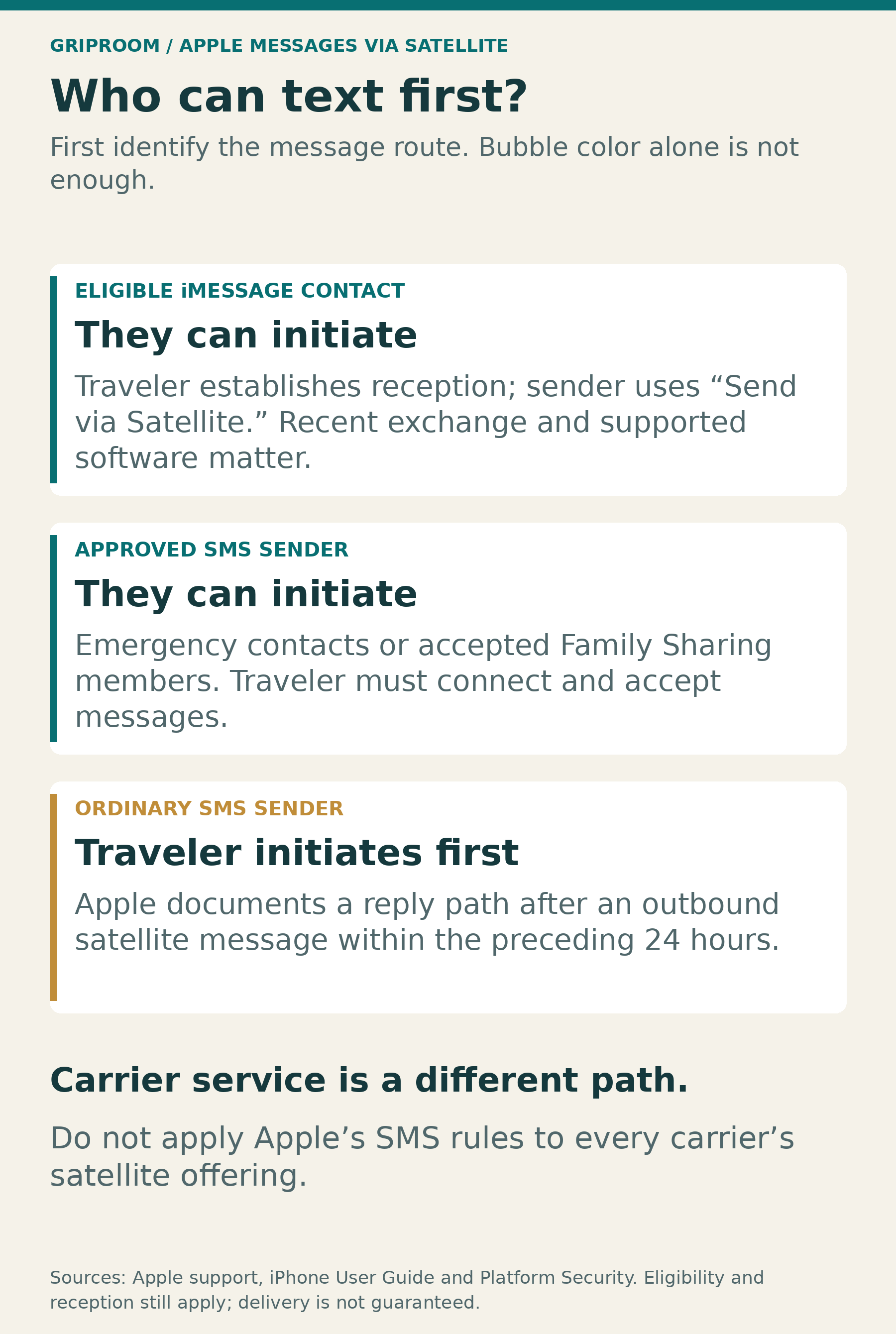
With Apple’s Messages via satellite, your emergency contacts and Family Sharing members can initiate an SMS conversation. Other SMS senders generally need you to message them first. An eligible recent iMessage contact has a different route: once you are accepting satellite messages, they can use the satellite-send option. You still need a usable satellite connection. This is not ordinary reception that follows you everywhere. Apple’s iPhone guide explains the separate messaging paths.
There is also a separate answer for carrier services such as T-Satellite. Before relying on any of this, establish which service your phone will use. “My iPhone has satellite” is the beginning of the conversation, not a complete contact plan.
First, identify which satellite service you mean
Apple’s built-in satellite features use its Globalstar partnership. Carrier-provided services use a different arrangement, such as a carrier’s partnership with Starlink. Apple distinguishes the two: carrier satellite connectivity displays SAT in the status bar, while Apple’s own features are accessible through Connection Assistant.
The hardware requirements differ, too. Apple’s features start with iPhone 14; its carrier-support guidance includes iPhone 13 and later, subject to software, carrier, and plan requirements. Having eligible hardware does not establish that a particular carrier feature is active.
This distinction prevents a common misunderstanding. A friend whose phone automatically receives messages through a carrier satellite connection has not necessarily demonstrated how Apple’s incoming-message rules work. The two people may both be using iPhones while relying on different services.
The next sections concern Apple’s Messages via satellite in the United States. The carrier alternative comes afterward.
Who can initiate an SMS conversation?
For Apple’s service, being saved in Contacts is not enough to give every SMS sender first-message access. The exceptions are emergency contacts and members of your Family Sharing group. Otherwise, Apple’s guide says you must first send that person an SMS through satellite before they can reply.
Check these details before leaving coverage:
Your SIM must be active, and iMessage should already be enabled.
SMS via satellite depends on carrier support.
The person and number you intend to rely on must match the contact arrangement you actually set up.
An emergency contact is a real role, not a shortcut to add indiscriminately. Apple’s Medical ID guidance explains that emergency contacts can receive notifications and location information following emergency use. Choose someone appropriate, tell them, and verify their number.
Likewise, a Family Sharing invitation is not the same as established membership. Apple requires the invited person to accept. There are broader account features and membership restrictions involved, so creating an artificial family group solely for one weekend’s texts is not a sensible default.
For a coworker, neighbor, or friend outside those arrangements, plan to initiate the ordinary SMS exchange yourself rather than assuming their first message will reach you.
iMessage has a different first-message rule
Do not apply the SMS contact exceptions to every blue-bubble conversation.
Apple’s guide describes iMessage satellite communication with supported, recent correspondents in your contacts. The person at home sees when you are accepting satellite messages and uses an additional send action. The documented path does not require that person to be an emergency contact.
The important distinction is between starting the conversation and starting satellite reception. An eligible correspondent may initiate the first conversational message, but that does not mean their text makes an unconnected phone begin receiving from orbit.
There is another catch for messages sent earlier. Apple’s support instructions say approved SMS messages sent before you started accepting satellite messages can arrive when you connect. An earlier iMessage is different: the sender needs to return to the conversation and tap Send via Satellite beneath the bubble.
Tell the person at home about that extra step. Otherwise, they may believe they have sent an important update while you believe there is nothing waiting.
Nor should a message on a laptop automatically count as successful delivery to the phone someone is carrying. In an October 2024 firsthand test published by TidBITS, Adam Engst discovered that apparently missing messages to one correspondent had appeared on her updated Mac, not her older-software iPhone. That early-software observation is not proof of a current universal bug. It is a useful reason to confirm the exact receiving device.
What the 24-hour and 30-day rules actually mean
Two time windows help explain why a contact can work in one situation but not another.
Apple’s Platform Security documentation says incoming SMS is eligible for satellite delivery if the off-grid user sent the sender a message within the preceding 24 hours, or if the sender is an approved emergency contact or family member. Other incoming SMS is stored encrypted for retrieval over traditional networks when the user returns online.
That is a reply-eligibility rule, not a promise that every queued message arrives within a day. Nor does it establish exactly what happens to an earlier blocked SMS if you subsequently initiate contact.
For iMessage, Apple describes exchanging messages within the preceding 30 days, because the devices need recent encryption-key material. That is not a 30-day guarantee of reception, and a name sitting in Contacts does not establish the necessary recent exchange.
The same technical document mentions an eight-hour maximum for a cryptographic session. Do not read that as eight hours of uninterrupted satellite coverage. These numbers describe different parts of the system, not three competing estimates of how long your phone stays reachable.
The practical preparation is simpler than the architecture: communicate with your intended contact before departure, and agree on a route and check-in schedule instead of depending on an old conversation thread.
What changes with T-Satellite?
T-Mobile describes T-Satellite as an automatic connection for enrolled, compatible devices when other cellular coverage is unavailable. Its advertised capabilities include messaging and, on supported devices, selected apps. Availability varies by device and service configuration.
That is not Apple’s emergency-contact SMS filter transplanted onto another satellite network. Do not assume the Apple 24-hour rule controls a T-Satellite exchange, or that completing Apple’s connection demo proves T-Satellite is configured.
T-Mobile also cautions that service can have gaps and delays. Automatic connection is not a guarantee of uninterrupted delivery. Before a trip, check your actual line’s eligibility, enrollment, supported device, and available features rather than relying on a generic advertisement.
The messaging protocol matters here. Apple explains that a green bubble can indicate RCS or SMS/MMS. Green does not prove that you have tested plain SMS. T-Mobile advertises broader protocol support than Apple’s own iMessage-and-SMS satellite pathway, so an Android conversation needs more precision than “we both saw green.”
For a rehearsal, note the service and message type actually shown. Otherwise, a successful exchange can answer the wrong question.
A successful demo is not a two-person test
Apple’s connection demo is useful practice. It is not evidence that your spouse can initiate a real message to your number, that your carrier supports the SMS path you expect, or that you will notice the message on the right device.
Apple’s connection instructions emphasize being outside with a clear view of the sky and horizon. Trees, terrain, and buildings can interfere. The connection can persist with the screen locked, but Apple says not to put the phone in a pocket or backpack while connecting. A locked screen is not the same thing as dependable reception while the phone is packed away.
Real-world timing can be messier than a demo. In an Outdoor Life test reported in October 2024, Natalie Krebs tested an iPhone 15 Pro in Utah. The published log included a failed attempt and canyon messages taking approximately 70 and 20 minutes, alongside much quicker deliveries.
Those results are not a current failure rate for all iPhones. They also do not isolate every incoming-first scenario. They do show why an animation or a sender-side timestamp is weaker evidence than the recipient reading back the message.
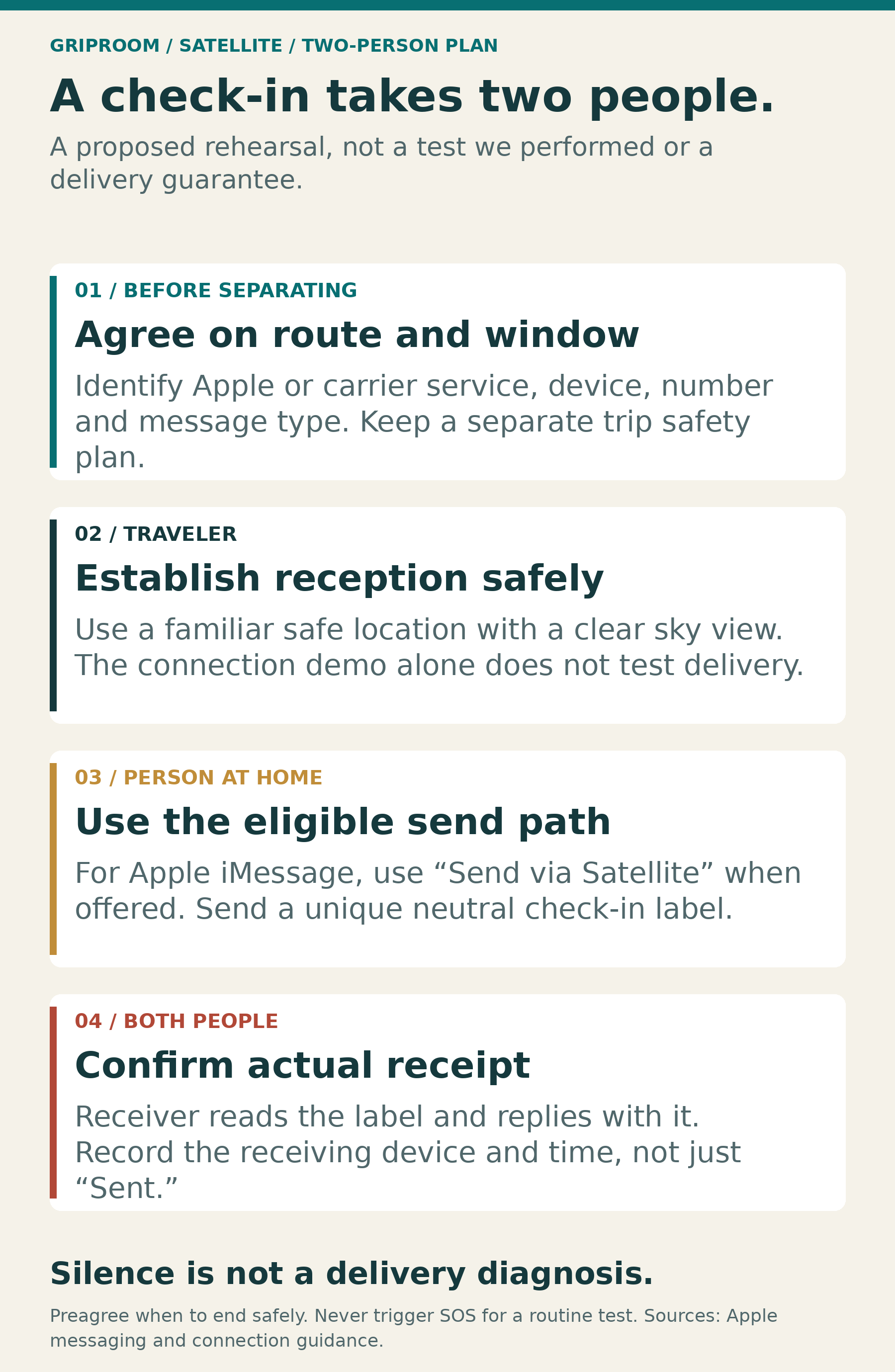
Rehearse the exchange you actually need
The following is a proposed reader exercise, not a test performed for this article. Use it only during a safe, ordinary outing with an easy return, a prearranged finish time, and no dependence on the experiment for your safety. Do not seek dangerous isolation or trigger an actual SOS to practice routine texting.
Agree on the question first. “Can you reply after I text you?” and “Can you reach me before I text you?” are different tests. Pick one, identify the service, and decide who stays on ordinary cellular or Wi-Fi coverage.
Make the message recognizable. Use something neutral and unique, such as “CHECK A1, 2:05 p.m.” Agree that the recipient will reply with the same identifier. That makes it harder to mistake an old message, a delayed duplicate, or a different conversation for success.
For an inbound-first iMessage rehearsal, do not start with an outgoing check-in. At the agreed time, the traveler opens actual satellite reception. The person at home looks for the satellite-acceptance notice, sends the test, and uses the extra satellite-send control when offered. If the expected controls never appear, record that you could not establish the intended path. Do not call it a successful test because a message eventually arrived through cellular coverage.
For SMS, use the contact arrangement you already intend to rely on. If the person at home is an established emergency contact or family member, try their first message before the traveler sends anything. If not, rehearse the traveler’s initial SMS followed by a reply. Do not remove a real emergency contact merely to create a test condition.
Record actual receipt. Each person notes when the specific message appears and which device displays it. If the protocol changes, or either phone returns to ordinary coverage, note that too. A ten-minute observation window can make the exercise manageable, but it is your chosen stopping point, not a service deadline. Record later arrivals separately.
End with a usable plan. Decide when the traveler will check, what the person at home should do if the expected send option is missing, and how missed check-ins fit the broader trip plan. A rehearsal is not a reason to weaken existing precautions or dismiss signs of a real emergency.
Plan for a conversation, not just a capable phone
These scenarios assume one person remains conventionally connected. Do not automatically extend them to two people independently off-grid. That introduces another reception schedule and another satellite connection; the documentation reviewed here does not establish a universal delivery guarantee for every such pairing.
For actual emergencies, use the appropriate emergency service rather than treating a family text as a rescue request. Apple directs off-grid users to Emergency SOS via satellite for emergency assistance, separately from ordinary messaging.
The most useful preparation is not telling someone, “You can text me anywhere.” It is telling them which conversation to use, whether you need to initiate, when you will check, and what counts as confirmation. The feature becomes more useful when both people understand their part.