GTA 6’s reported 210GB PS5 download is large enough to make storage preparation part of the launch ritual. But the number and the schedule come with different levels of certainty: 210GB is attributed reporting, while Rockstar has announced preloading from local midnight on November 12, 2026, ahead of the November 19 launch.
The useful move is to check your console’s available space and download settings now, then use its actual download screen for the final requirement. Buying a bigger drive on the assumption that every version needs exactly 210GB would get ahead of the evidence.
Here is what the report establishes, what the official instructions say, and how to prepare without mistaking a preload for permission to start playing.
Is GTA 6 really 210GB?
The figure comes from a PlayStation Game Size report cited by Insider Gaming on October 27. The outlet says it corroborated the information. That makes 210GB a useful planning reference for PS5 owners, provided the word reported travels with it.
It does not establish an Xbox Series X|S download size. It also does not tell you the final space required after installation, the size of any launch patch, or how much temporary room the installation process might need.
The public PlayStation listing and Xbox product page checked for this guide did not display a GB requirement. That is a limited observation about those pages, rather than proof that a platform database contains no size information.
Keep three quantities separate. The download is data transferred over your connection. The installed game occupies space on the drive. An update is an additional transfer that can alter the installed files. A number reported for one of those jobs should not quietly become a guarantee about the others.
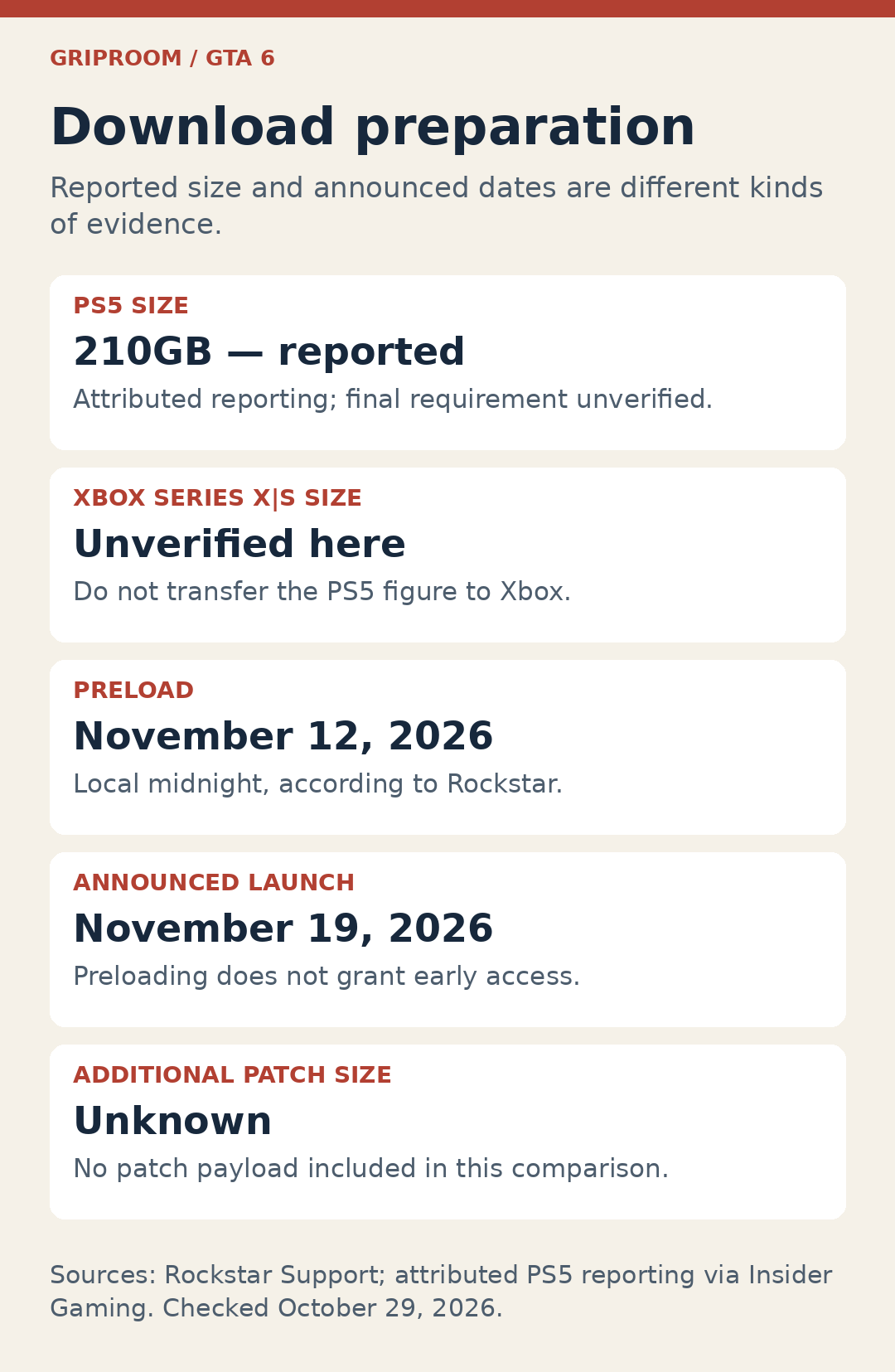
The PS5 figure is a reported 210GB; an Xbox requirement is unverified here; preload begins November 12 at local midnight; launch is announced for November 19. No verified patch size is included.
When does the GTA 6 preload start?
Rockstar’s platform and editions FAQ says preloading begins at local midnight on November 12. Digital preorder owners can download before launch. A boxed-copy buyer can also preload after receiving and redeeming the included download code.
That last point matters: the boxed Standard Edition contains a code, not a disc. Rockstar expects retailer shipping and pickup to begin November 12. Shipping from that date does not guarantee that a parcel reaches your door that morning, so a physical preorder can introduce a delivery dependency before the download even begins.
Preloading puts the files on your console. It does not move the announced November 19 playable release forward. A completed progress bar is useful preparation, not early access.
Nor should “local midnight” for preload be stretched into a worldwide launch-time chart. A storefront timestamp by itself is not enough to establish a universal simultaneous unlock. Follow the schedule shown for your actual platform and region when the playable release approaches.
How much space should you clear?
Start with available space, rather than the capacity printed on the console’s box. The practical question is whether a supported drive has enough free room for the requirement the console displays when the download becomes available.
On PS5, open Settings > Storage. Sony’s storage guide explains how to inspect usage and move or delete content. Reviewing a few large games you are no longer playing can be a more sensible first step than immediately ordering hardware.
If you delete a game to make room, think about the later download you are creating for yourself. A player with a slow connection may prefer moving supported content to another drive where possible. The tradeoff is convenience now against another transfer later; it depends on what you intend to play.
There is no verified universal “clear 250GB” rule in the sources used here. Leaving additional room is a reasonable personal precaution, but it should not be presented as Rockstar’s requirement. Wait for the console’s actual size and free-space prompt before treating any exact buffer as mandatory.
Can GTA 6 run from an external drive?
The drive’s role matters as much as its capacity.
For PS5 games, Sony supports playing from console storage or a compatible M.2 SSD. A PS5 game placed on USB extended storage must be moved back to playable storage before you run it. Sony also says one game cannot be split across console storage and an M.2 drive: two partly empty drives do not combine into one larger installation slot.
If you are considering an upgrade, use Sony’s M.2 requirements and installation instructions. A drive being advertised as an SSD does not, by itself, establish PS5 compatibility.
Xbox’s official Series X|S storage explanation similarly distinguishes its internal SSD and Storage Expansion Card from USB storage used for storing and transferring games. That is general hardware guidance, not a GTA 6 installation test. Do not buy a generic USB drive expecting it to perform the same job as supported native game storage.
The sensible purchase decision is therefore specific: which console do you own, which drive can run its games, and how much supported space do you actually need? The reported PS5 figure alone cannot answer all three.
How long would a 210GB download take?
A 210GB transfer at a sustained 100Mbps would take 4 hours 40 minutes under ideal conditions. At 25Mbps, it would take 18 hours 40 minutes. Those are conditional calculations, not measurements of GTA 6 downloading from either console network.
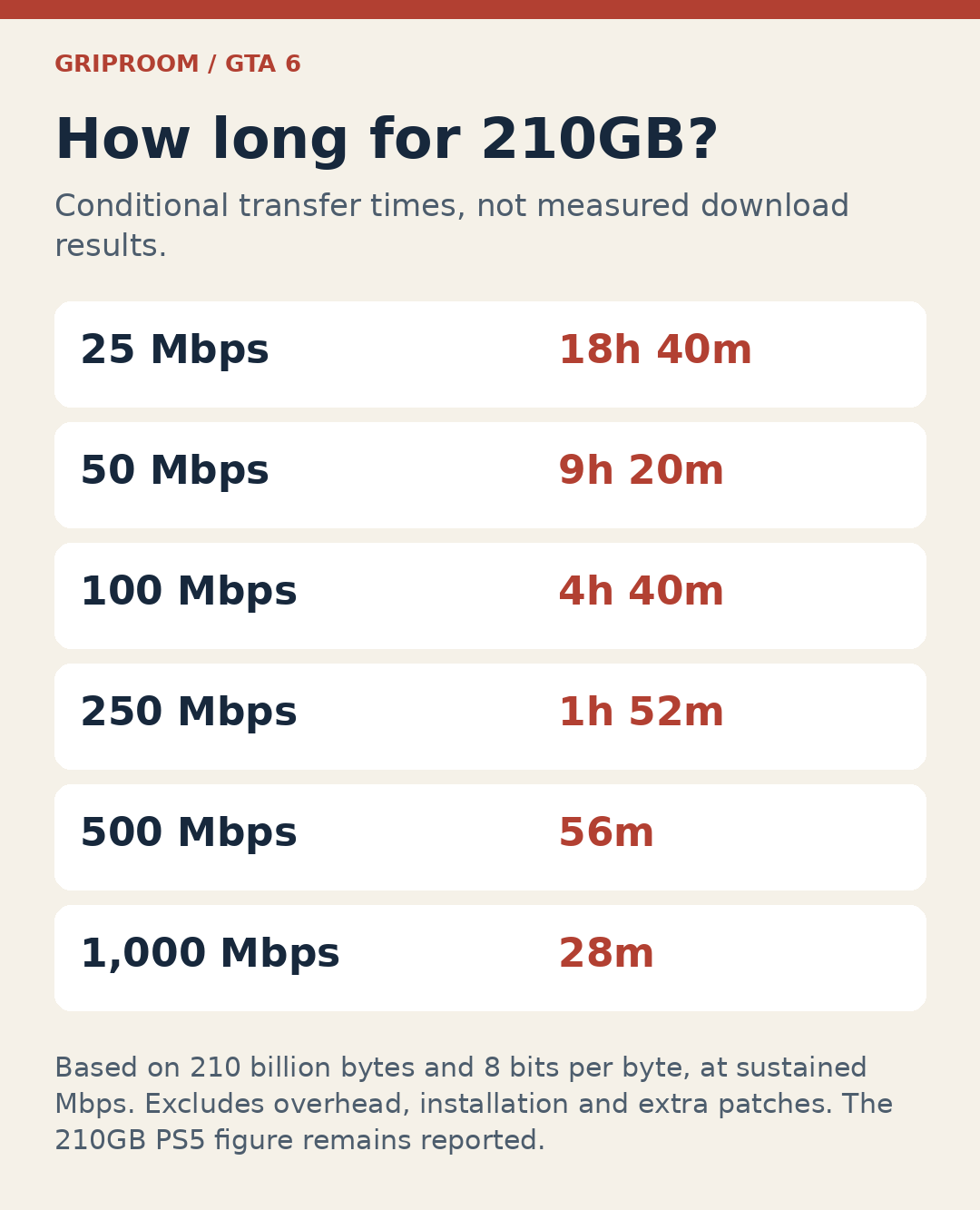
t a sustained 25Mbps, 18 hours 40 minutes; 50Mbps, 9 hours 20 minutes; 100Mbps, 4 hours 40 minutes; 250Mbps, 1 hour 52 minutes; 500Mbps, 56 minutes; 1,000Mbps, 28 minutes.
These examples treat 210GB as 210 billion bytes, with eight bits in a byte. They assume the stated speed is sustained for the entire payload. Your broadband plan’s advertised speed is a poor substitute if the console receives much less of it in practice.
For planning, use the speed your console actually sustains on a substantial download as a reference, while remembering that another server or another evening can behave differently. Other household traffic, wireless conditions and service congestion can affect the result. The arithmetic does not include installation or an unknown additional patch.
The practical lesson is less glamorous than a fastest-possible time: someone on a slower connection has a strong reason to use the preload window. The download can happen before launch day becomes the deadline.
Check the PS5 preorder settings before November 12
Owning a preorder and having its download ready are separate things worth checking.
Sony’s preorder instructions direct you to the title in Game Library, then its countdown timer, where you can review the contents selected for automatic download. Check the actual GTA 6 preorder entry rather than assuming that a general update setting covers it.
If you want the PS5 connected while resting, Sony’s automatic-download guidance points to Settings > System > Power Saving > Features Available in Rest Mode > Stay Connected to the Internet. Available storage still matters. A connection setting cannot create room on a full drive.
For Xbox, check the preorder and download options available on your own console. The PS5 menu path above is platform-specific and should not be followed as an Xbox instruction.
When preload opens, confirm that the download has actually begun and inspect the size your console reports. A brief check then is more useful than discovering an untouched preorder on launch evening.
The preparation that is worth doing now
Check supported free space, decide which old installations you can move or remove, and review the preorder’s download settings. If you ordered a box, confirm how you will receive its code.
Those steps remain useful even if the reported 210GB figure changes. The final decision about buying storage can wait for a verified requirement; the housekeeping does not need to. The best launch-day progress bar is the one you already dealt with.